

18.1 MIDI Connections
MIDI is a standard music protocol used to connect multiple devices in order to communicate and was first introduced in the early 1980’s. Deluge uses the most common 5 Pin DIN connection as well as a USB connection.
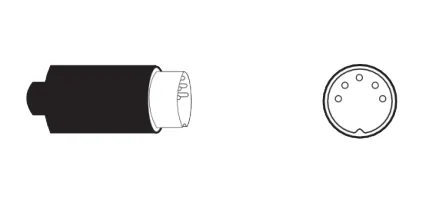
Deluge has both a MIDI in and Out 5-pin DIN connection.
USB MIDI is also available via the Type-B USB connection.
MIDI DIN synchronises on PPQN pules per quarter note. 24 and 48 pulses per quarter note (PPQN) are most common. This can be adjusted in the settings, trigger menu in Deluge and by default is set to 24.
Deluge uses MIDI CC (control change) messages while also providing program change and bank change options. This allows the presets and patches of other synths and gear to be changed and controlled as well as adjusting parameters remotely.
USB Host
When Deluge is powered up (external supply, not internal battery) it can be connected via the USB connection to other devices as a USB host. The USB MIDI device must be connected on starting / booting Deluge up. The connection can be disconnected / reconnected once it’s booted in this set- up.
Deluge supports one USB MIDI ‘hub’ devices as a host. Powered USB Hubs are also useful in powering the Deluge as well as other connected USB devices. Multiple hubs especially when more than four connected may not operate correctly and ‘MAXIMUM NUMBER OF USB DEVICES ALREADY HOSTED’ is displayed if more than four devices are connected.
Deluge will display ‘USB HUB ATTACHED’ when a connected hub device is detected and working and ‘USB DEVICE DETACHED’ when a device is detached. If your device doesn’t work and you get no error message, it may be a power issue.
Hosted MIDI USB devices are supported for both MIDI input and output.
Differentiating MIDI Input devices
MIDI devices have 16 available MIDI channels all of which can be used to communicate with Deluge by USB or the MIDI DIN port. Multiple devices can also be connected to Deluge with the use of a USB hub and also through the MIDI port which would mean more than 16 channels are present simultaneously in the network, providing input to Deluge. These channels can be set to control different functions, for example synths. Deluge can be set to differentiate between the incoming MIDI from different devices. These need to have been ‘learned’ in Deluge to assign the input controls to the correct function.
Setting MIDI differentiation on
- Press Shift +
 Select to access the configuration menu.
- turn
 Select and scroll to ‘MIDI’. Press Select.
- turn Select and scroll to ‘DIFFERENTIATE INPUTS’. This enables Deluge to differentiate from different connected devices across multiple channels.
- Press Select and then turn Select to set to ON. This allows multiple devices to be differentiated in Deluge.
- Press Select and then turn Select to set to OFF. This turns differentiation off to revert to the more traditional setup.